Hi Ashish,
Module no. 24
TestNG and Hybrid Framework(DataDriven+Keyword)
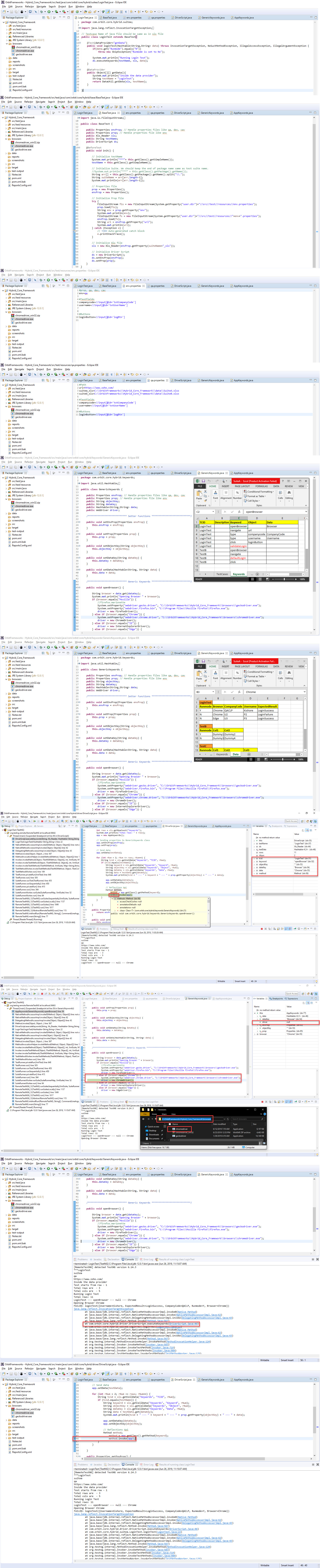
Not able to launch the firefox driver. Can you please review my code and let me know where exactly i am doing it wrong. I have attached the exception that i am getting.
Exception:
[RemoteTestNG] detected TestNG version 6.14.3
***LoginTest
suitea
qa
https://www.zoho.com/
Inside the data provider
Test starts from row - 1
Total rows are - 3
Total cols are - 5
Running Login Test
Total rows: 11
LoginTest --- openBrowser --- null --- Chrome
Opening Browser Chrome
FAILED: loginTest({Username=Kishore, ExpectedResult=LoginSuccess, CompanyCode=QACLP, Runmode=Y, Browser=Chrome})
java.lang.reflect.InvocationTargetException
at java.base/jdk.internal.reflect.NativeMethodAccessorImpl.invoke0(Native Method)
at java.base/jdk.internal.reflect.NativeMethodAccessorImpl.invoke(NativeMethodAccessorImpl.java:62)
at java.base/jdk.internal.reflect.DelegatingMethodAccessorImpl.invoke(DelegatingMethodAccessorImpl.java:43)
at java.base/java.lang.reflect.Method.invoke(Method.java:567)
at com.orbit.core.hybrid.driver.DriverScript.executeKeywords(DriverScript.java:60)
at com.orbit.core.hybrid.suitea.LoginTest.loginTest(LoginTest.java:22)
at java.base/jdk.internal.reflect.NativeMethodAccessorImpl.invoke0(Native Method)
at java.base/jdk.internal.reflect.NativeMethodAccessorImpl.invoke(NativeMethodAccessorImpl.java:62)
at java.base/jdk.internal.reflect.DelegatingMethodAccessorImpl.invoke(DelegatingMethodAccessorImpl.java:43)
at java.base/java.lang.reflect.Method.invoke(Method.java:567)
at org.testng.internal.MethodInvocationHelper.invokeMethod(MethodInvocationHelper.java:124)
at org.testng.internal.Invoker.invokeMethod(Invoker.java:583)
at org.testng.internal.Invoker.invokeTestMethod(Invoker.java:719)
at org.testng.internal.Invoker.invokeTestMethods(Invoker.java:989)
at org.testng.internal.TestMethodWorker.invokeTestMethods(TestMethodWorker.java:125)
at org.testng.internal.TestMethodWorker.run(TestMethodWorker.java:109)
at org.testng.TestRunner.privateRun(TestRunner.java:648)
at org.testng.TestRunner.run(TestRunner.java:505)
at org.testng.SuiteRunner.runTest(SuiteRunner.java:455)
at org.testng.SuiteRunner.runSequentially(SuiteRunner.java:450)
at org.testng.SuiteRunner.privateRun(SuiteRunner.java:415)
at org.testng.SuiteRunner.run(SuiteRunner.java:364)
at org.testng.SuiteRunnerWorker.runSuite(SuiteRunnerWorker.java:52)
at org.testng.SuiteRunnerWorker.run(SuiteRunnerWorker.java:84)
at org.testng.TestNG.runSuitesSequentially(TestNG.java:1208)
at org.testng.TestNG.runSuitesLocally(TestNG.java:1137)
at org.testng.TestNG.runSuites(TestNG.java:1049)
at org.testng.TestNG.run(TestNG.java:1017)
at org.testng.remote.AbstractRemoteTestNG.run(AbstractRemoteTestNG.java:115)
at org.testng.remote.RemoteTestNG.initAndRun(RemoteTestNG.java:251)
at org.testng.remote.RemoteTestNG.main(RemoteTestNG.java:77)
Caused by: java.lang.NoSuchMethodError: com.google.common.base.Preconditions.checkState(ZLjava/lang/String;Ljava/lang/Object;Ljava/lang/Object;Ljava/lang/Object;)V
at org.openqa.selenium.remote.service.DriverService.findExecutable(DriverService.java:134)
at org.openqa.selenium.chrome.ChromeDriverService.access$000(ChromeDriverService.java:35)
at org.openqa.selenium.chrome.ChromeDriverService$Builder.findDefaultExecutable(ChromeDriverService.java:159)
at org.openqa.selenium.remote.service.DriverService$Builder.build(DriverService.java:355)
at org.openqa.selenium.chrome.ChromeDriverService.createDefaultService(ChromeDriverService.java:94)
at org.openqa.selenium.chrome.ChromeDriver.<init>(ChromeDriver.java:123)
at com.orbit.core.hybrid.keywords.GenericKeywords.openBrowser(GenericKeywords.java:56)
... 31 more
Instructor
Ashish Thakur Replied on 26/06/2019
did you try debugging the code?
Please check GenericKeywords.java line number 56 for the possible error
Hi Ashish,
Yeah, i have debug the code and still not able to identify where exactly the problem is coming from.
I checked line number 56 in GenericKeywords.java and chrome driver is set perfectly fine.
I am sharing the screenshot. Please review it and let me know where the exactly the problem lie.
Instructor
Ashish Thakur Replied on 26/06/2019
I need to analyze your project. Please export your project in a compressed zip file and share with us.
In addition to that try adding the path of ChromeDriver to the path variable under System Environment Variables
Hi Ashish,
I have added the path of ChromeDriver to the path variable but still result is same. Please download the attached project zip file.
Thank you,
Instructor
Ashish Thakur Replied on 28/06/2019
I reviewed your code and found a dependency issue with Guava. Please update the dependency as mentioned below and then try running the code again.
<dependency>
    <groupId>com.google.guava</groupId>
    <artifactId>guava</artifactId>
    <version>27.1-jre</version>
</dependency>
Hi Ashish,
I have added the dependency of guava 27.1-jre in pom.xml file but it didn't solved the issue.

Instructor
Ashish Thakur Replied on 28/06/2019
After updating pop.xml, you also need to run these two commands
mvn compile
mvn eclipse:eclipse
After executing these commands you need to update your project in eclipse.
In addition to this, make sure you're using the correct driver for the version of chrome browser you are using.
Hi Ashish,
Thank you so much as the solution you have given has resolved the issue. How did you found out that guava version dependency is causing this issue? Is it really the guava dependecy issue or is it the ChromeDriver version that is compatible for my chrome browser fixed this issue?
Best Regards,
Kishore

Instructor
Ashish Thakur Replied on 29/06/2019
Chrome Driver depends on Guava, that was causing the version mismatch issue. Due to that, the browser was not launching.
Got it. Thanks for all the help. I think i don't have previllege to close this thread. Please close it and your solution resolved my issue.
Thank you,
Best Regards,
Kishore